Showing posts with label Qt. Show all posts

Wednesday, 9 November 2022

Why Qt containers? And do we ❤️ them?

I have read the following post titled  "I ❤️ Qt containers! :)" on the Qt Development mailing list and found it extremely interesting. It is written by Volker Hilsheimer, the current chief maintainer of the Qt project, and elaborates on some design principles Qt libraries are using. The post was was written as a response to more general question of why isn't Qt switching to standard C++ library containers.

I hope nobody gets offended that I repost it here - I do it because not everyone can read the archives. I'd also like to be able to find it for myself in case I'd like to ponder on Qt containers and their design.

So happy reading (emphasizings and formattings are all mine):

" .... Historically, STL implementations were unusable and unreliable for cross platform development (we supported HP-UX, AIX, SGI, Sun back in those days), and generally incomplete (only a few associative containers pre-C++11). So, 30 or 20 years ago, or perhaps up to C++11 and until we could drop commercial Unix systems as irrelevant (esp for Nokia’s plans; although no idea about the quality of the STL for Symbian C++), the STL wasn’t really much of an option.

However, this is a more fundamental question about what we try to achieve with Qt. Qt has never tried to be a C++ library that follows the design principals of the std library. In many cases, we don’t even care that much about the single responsibility principle (hello, QWidget). Qt container classes have always been more than a dumb storage of data on top of which algorithms operate. QString is a very rich class with tons of functionality, specific to text handling. std::string is a sequence of characters. Working with QString vs std::string to deal with user-provided text input requires rather completely different mindsets.

Our core competence of designing intuitive APIs does not exclude container classes. That’s why with Qt containers, we can write
if (list.contains(value)) {
    // ...
}
rather than
if (std::find(list.begin(), list.end(), value) != list.end()) {
    // ...
}
Perhaps it makes me an inferior C++ developer, but I rather prefer the former. Well, std::map got a contains(), and std::string a starts_with() in C++ 20, only 25 years late(r).

Indeed, sometimes that convenience means that our users, and we ourselves, can do something silly like:
if (map.contains(key)) {
    value = map.value(key);
    // do stuff with value
}
Convenience is no excuse for us as developers of Qt to be sloppy. It is also no excuse for ignoring the new features we get into our toolbox when we move to C++ 20 or 23. But that C++ 20 finally introduces std::map::contains (but not std::vector::contains…), or adds std::span, is also no excuse for us to toss our own designs out of the window, and to demand that all Qt users must embrace the STL instead.

One of Qt’s goals has always been to make C++ accessible for people that come from other languages, with a programming model that is not rooted in how the C++ standard library does things. That programming language used to be Java - hence our Java-style iterators in Qt containers. Today, people perhaps rather learn programming with Python in school. There will always be more people that have learned programming with other languages, than those that have carefully studied the C++ standard and the impact of various constructs in Compiler Explorer. We must make it easy for the former, while also enabling the latter.

And there are the practical reasons why I don’t want to replace QList with std::vector and QHash with std::unordered_map: we store our data structures in the d-pointer, and we want to stay flexbile wrt the actual stored type. So copy-elision and return-value-optimization don't buy us much: we need to return copies of containers from our property getters. Not const references to containers, and not temporary lists that can be moved out. So we do need reference counting.

For the here and now, and the last 25 years of Qt and C++, it’s not helpful to argue that we will soon be able to return a type-erased span and get rid of “horrible and inefficient” APIs returning owning containers. std::span is a new tool, opening up new opportunities; the expressiveness of e.g. C++ ranges might even make it much easier for someone coming from e.g. Python to use Qt, while allowing us to write much more efficient code. So we do need to consider how we name and design our APIs today so that we can add new APIs to unlock that power in the future. And we need to keep looking for ways to improve what we have - with extra awareness of what potential changes mean for our users and co-contributors.

Those improvements cannot require that we force everyone to change significant amounts of existing code, all the time; or that they have to regularly unlearn established Qt patterns; or that they have to live without the convenience. Yes, I’m biased, but I honestly don’t see any universe where a Qt without our implicitly shared, owning, old-fashioned containers, and instead with only STL containers and programming paradigms, would have been as easy, or as much fun, to use.

Volker
" 
Summing up

As it was already said elsewhere, "Qt is known  for making C++ easy and accessible"! You might say it's C++ for the people.  Maybe it's for that reason that C++ didn't go the way of Haskell despite Commitee's best efforts? ๐Ÿ˜


A screenshot (I forgot from which presentation...)

PS: I didn't remove anything from the original post for the sake of completeness


Thursday, 31 December 2020

A new code example for the "Qt Performance" book


Recently I added a new example* to my "Qt5 Performance" book's resources that I didn't manage to include in the original release - the trace macros creating output in chrome:tracing format. 

I think it's a very cool technique - instrument your code and than inspect the result as a graphic! On Linux we have flame graph support in the standard tooling integrated with Qt Creator.

On Windows, however, we do not have such a thing! And because I decided to use Windows as the deveolpment platform for my book, we have a kind of problem here, so creative solutions are needed!

And I already came up with an idea for that in the book - we can use libraries (like minitrace, the library we are using in this example ) to generate profiling output in a format that the Chrome's** trace viewer will understand! You didn't know that Google's Chrome had a built-in profiler? Some people assume it’s only for profiling “web stuff” like JavaScript and DOM, but we can use it as a really nice frontend for our own profiling data.

However, due to lack of time I couldn't try it out when I was writing the book ๐Ÿ˜ž, but with the new example I added  I was able to generate output you see visualizedin the figure below:


Here is the code example I used - as you can see, you have only to insert some MTR_() macros here and there:
  int main(int argc, char *argv[])
  {
    mtr_init("trace.json");

    MTR_META_PROCESS_NAME("QmlWithModel");
    MTR_META_THREAD_NAME("Main GUI tread");
    MTR_BEGIN("main", "main()");

    QCoreApplication::setAttribute(Qt::AA_EnableHighDpiScaling);
    QGuiApplication app(argc, argv);

    QStringList countryList;
    countryList << "Thinking...";

    MTR_BEGIN("main", "load QML View");
    QQuickView view;
    QQmlContext *ctxt = view.rootContext();
    ctxt->setContextProperty("myModel", QVariant::fromValue(countryList));

    view.setSource(QUrl("qrc:/main.qml"));
    view.show();
    MTR_END("main", "load QML View");

    // get country names from network
    MTR_BEGIN("main", "init NetworkMgr");
    QNetworkAccessManager networkManager;
    MTR_END("main", "init NetworkMgr");
 
    ....

PS: heob-3 (i.e the new version of the heob memory profiler we discussed in the book) has a sampling profiler with optional flame graph output!!! I think I have to try it out in the near future!

--
* you can find the new example here, and the generated JSON file here

** Chrome browser's about:tracing tool. You can use it like this:

  • go to chrome://tracing in Chrome
  • click “Load” and open your JSON file (or alternatively drag the file into Chrome)
  • that's all

More about basic QML optimizations


You might perhaps already know that I recently wrote a book (blogged about it here)! In the book we discuss various general program performance topics but also some more specific, Qt related ones, for example Qt's graphical or networking performance.

Recently, as I was watching some QML presentation I realized that some very basic pieces of performance advice I just glossed over in the book could (and should) be explained in a much more detailed manner to build a general understanding of this technology's caveats.

In Chapter 8.4, where the book discusses QML's performance, I simply wrote that:
"If an item shouldn't be visible, set its visible attribute to false, this will spare the GPU some work. In the same vein, use opaque primitives and images where possible to spare GPU from alpha blending work."
As I re-read this section on some occasion I somehow had to notice that what seemed pretty clear in writing, isn't that clear when read a year later! I started to think why this passage is not that lucid as it should be, and I noticed, that my intended formatting was gone! Now we have in the book:
"... set its visible attribute to false" 
instead of
"... set its visible attribute to false"
as I wrote it initially!!! The formatting went somehow missing and I didn't notice it while proofreading. For me this change rendered the sentence pretty unintelligible :-/.

But anyway, I could have explained it in a little more detailed manner* - so let's try to make a better job and explain why the visible attribute is so important!

To state it bluntly - QML won't do any optimizations to prevent drawing items the user cannot see, like items which are out of bounds or are completely obscured or clipped** by other items! It just draws every single item with visible set to true, totally unconcerned with its real visibility! So we have to optimize manually and:
"... set its visible attribute to false"
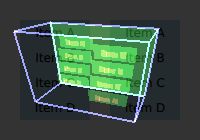
But how on earth should we know which items are invisible in which situation? Easy, just set this environment variable: QSG_VISUALIZE=overdraw and Qt will show the overdrawn items using a different color and making them visible as can be seen in this pic from Qt documentaion:


That's pretty cool!

This was my state of knowledge until recently (learned about that in this KDAB presentation) but than I read this line in Qt Quick 2D Renderer's documentation:
Qt Quick 2D Renderer will paint all items that are not hidden explicitly with either the visibility property or with an opacity of 0. Without OpenGL there is no depth buffer to check for items completely obscured by opaque items, so everything will be painted - even if it is unnecessary.
Qt Quick 2D Renderer is a raster-graphic replacement for the standard OpenGL-based QML renderer. Does that (by tertium non datur) mean that with OpenGL we do use the depth buffer after all? This could be an unfortunate formulation, so we'd like to stay on the conservative side but maybe a little more investigation would be appropriate in this case. Have you heard anything about it?

--
* This might be due to the very tight deadlines :-(

** as Qt documentation says:
"If clipping is enabled, an item will clip its own painting, as well as the painting of its children, to its bounding rectangle."

Monday, 11 May 2020

A technique for connection checking in Qt


Recently, I stumbled upon a technique for checking if the connect() call for Qt signals/slots was successfull. You may ask what the problem is - just check the result of the call, how difficult can that be?
  bool ok = connect(...);
  Q_ASSERT(ok);
This doesn't look as it's much! However, in a standard Qt project you won't see that because it doesn't scale really well. What you'll normally see is this:
  connect(a, SIGNAL(...), b, SLOT(...));
  connect(c, SIGNAL(...), d, SLOT(...));
  connect(e, SIGNAL(...), f, SLOT(...));
  // etc..
Repeated insertions of Q_ASSERT(ok) would kill readability in such case! In a couple of projects I've seen that people were trying somehow to have the cake and eat it - do not sacrifice readibility but nonetheless report a failed connect. This was done by means of custom Qt builds, where the connect() function was changed to include an assert or to throw an exception in case of failure.

Digression: I'm normally not a fan of exceptions but here they seem to be perfect a perfect match, don't they? Just signal some error condition without polluting the code with error handling! What's here not to love? But on a closer inspection it poses problem in Release builds, as in production environment we do not want to crash a program when some connection are not right. Ok, with enough testing and exception handling code it's not a problem, but asserts are a much simpler method to achieve the same goal.

Technique:

So let us proceed to the advertised technique:
    v << connect(...);
How is the shift omperator implemented? Let's have a look:
    ConnectionVerifier& ConnectionVerifier::operator<<(const QMetaObject::Connection& connection)
    {
        verify(connection);
        return *this;
    }

    void ConnectionVerifier::verify(const QMetaObject::Connection& connection)
    {
        const bool connected = (connection != nullptr);
        //Q_ASSERT(connected);
        if (!connected)
        {
            throw Exception("Could not establish signal-slot connection.");
        }
    }

Now we can easily scale:
  v << connect(a, SIGNAL(...), b, SLOT(...));
  v << connect(c, SIGNAL(...), d, SLOT(...));
  v << connect(e, SIGNAL(...), f, SLOT(...));
  // etc..
Well, this is the code as I found in to be used in the project - somehow the dychotomy of exceptions and asserts we discussed before wasn't resolved by the authors. Admittedly, both alternatives have their merits.

Summing up:

So will I use this technique? Well, it's most useful for the old connect() syntax where the signals and slots are passed as (Q)strings using the SLOT() and SIGNAL() macros - here it is very easy to accidentally misstype the name or parameters of the corresponding slot/signal, believe me,

But with advent of Qt 5 we have also the modern, type-safe syntax alternative:
  connect(a, &A::singnalA, b, &B::slotB);
which I'm using quite exlusively right now. Theoretically there are some corrner cases where it also could fail, but the standard problem we had in the old days, i.e. the typos, is solved now.

However, if you inherited some giant legacy Qt application wehich uses the old connect() syntax, you might be thankfult to have this trick up your sleeve!

Monday, 4 May 2020

Example Programs form the Qt 5 Performace Book


Hi all! You will meanwhile probably have learned that I wrote a book about C++ program performance in the context of the Qt framework (you can have a look at the TOC here).

But along the book I also created quite a few example programs, which, as a rule, aren't discussed in the book. Some of them are pretty nice, so I decided to write up what they are and what they do.

There are two kinds of example programs in that collection: ones that illustrate some performance optimization idea, but also ones which just show how to use some of discussed Qt features. So if you want just learn some Qt usage, you might find it interesting. Also if you are interested in details on the techniques mentioned in the book, you'd better look into the examples, because the book didn't have place for step-by-step exlanations.

Chapter 1: Intro

At the moment no code and no resources here. Sorry. Some examples for usage of basic performance techniques would fit here in nicely, so maybe in the future...

Chapter 2: Profiling

QmlWithModel

This is the program we will be using to show how to take advantage of profiling tools. It has a QML GUI showing all the countries where Qt is used. This list is fetched with an HTTP request from the internet:


As you can check in its code, we can enable:
  •  a memory leak and 
  •  excessive burning of CPU cycles 
in order to show how to find these problems using profilers.

Additionally, there's a recorded ETW trace file of the above application to be browsed with the UI for ETW tool mentioned in the book:


Here you can take your time and look into different metrics which can be collected with ETL!

Addendum: I always wanted to include an example usage of  some flame graph generators in your code, but never got round to it. Maybe I'll find some spare time for it.

Chapter 3: C++ and Compilers

ClassicTemplateTricks

Here we show some of the template techniques mentioned in this chapter, e.g, expression templates for optimized string concatenation, CRTP for avoiding run-time polymorphism and compile-time calculations using recursive templates.


Addendum: Because Qt 5.12 required C++11, the techniques shown in book are the ones supported by that standard. But for example the expression templates could be replaced with fold expressions in C++17!*

Compiler Explorer Tests

Some code you can copy and paste into Matt Godboldt's Compiler Explorer and look at the assembly it produces. Here we can observe such optimization as:

- compiler optimization examples: the basic examples discussed in the book - avoidance of direct summation, elision of allocations, etc.


- constexpr factorial: here you can see the proof that a factorial can be calcualted at comple time! This time without templates, but using constexpr instead!


- constexpr hash: and here is the equivalent proof for a compile-time hash function!


- restrict and pure: here we can see how the restriced and pure attributes can guide the compiler for better optimization and how it's absence worsens the generated code. Unfortunately these attributes are only avaliable as compiler extensions.


- UB examples: here we have a few UB cases mentioned in the book


So just grab the snippets from example files, paste them into Compile Explorer an see live how different compilers optimize your code behind the curtains!

MemoryMgmExamples  - these are examples of a custom memory managers and allocators. They will trace to cout to show when they are used:


MoveTest - in a similar manner, an example usage of the move semantics, also tracing to show that it's working:


Chapter 4: Data Structs and Algorithms

Interning of strings - an example implementation of string interning. As this would be to detailed to explain in the book, I just provided some code for the curious to read through:


Addendum: with Visual Studio compiler we can activate string pooling option to automatically remove duplicate strings!

Schwartzian transform - here we are using the ominous Schwarzian transforrm to paint triangles and christmas trees ๐ŸŽ„!


StdSearch - here we show the usage of the new C++17 Boyer-Moore searcher


Chapter 5: Multithreading

ActiveObject - an implementation of the "Active Object" pattern. You surely remember that we can use this pattern to implement a (nearly) share-nothing multithreading scheme, do you?


ConcurrentAndFutures -  here we load images asynchronously using futures and can compare this to a simple synchronous loading strategy by pressing the "Load All at Once" button:


QFutureInterfaceExample - this is an example explaining usage of the undocumented QFutureInterface class which is widely used in Qt Creator


ThreadsAndTimers - basic example for starting timers in threads (because it can be somehow confusing)


Chapter 6: Case Studies

In this chapter we could do with some more examples, don't you think? Because we have only this single one:

SvgCache - here I show an implementation for the SVG cache we discussed in 6.4.


Chapter 7: I/O and Parsing

JsonExample - example of basic JSON parsing, nothing special, I know


MemMappedFile -  a hands-on demonstration of how to map a file onto memory:


SqlLiteExample - shows example usage of the SQLite database.

First we have to create the DB offline:


then we wil perform some simple SQL manipulations on it:


StreamReaderExample - again a basic example: parsing XML data this time


Chapter 8: Graphics

These examples mainly illustrate the discussion of various Qt graphic interfaces, but the minimal FPS counter can be used as a performance tool as well.

CustomQmlElementsTest - here we paint a simple triangle in QML using several ways to define our own, custom QML element. The FrameBufferTriangle uses custom OpenGL painting on current OpenGL context.


FpsCounterExample - want to know how to implement a live FPS counter for your application? Here we use a particle system to stress the QML runtime measure (and display it in an extra widget!) the FPS rate that can we are able to achieve:


OpenGLWidgetExample - we use Qt's OpenGL support for widgets to draw this classic triangle picture:


It used the most basic (and old...) OpenGL 1.0 API, but hey, this book isn't a graphic tutorial - I just needed this picture for the explanations of how the graphics pipeline is working. Please bear with me.

Qt3DSphereExample - look what is possible with Qt 3D! We animate a rotating sphere using the Phong lighting model:


It is also a very basic program, but the result is rather cool (at least for me).

Chapter 9: Networking

Here I wanted to write some basic demonstrators running client and server on the same machine to show basic usage of TCP sockets and HTTP transport mechanism.

EchoServerTcpExample - an echo server: the client will connect on a given port and the server will echo every data it receives from client!


HttpDownloadExample - here we will connect to a given web address, then fetch and save some resources from there. Additionally, the progress of file download is visualised with a progress bar.


If you have Python installed on your machine, you could start a local web server on some directory and then run this testapp locally. As I mentioned in the book, Qt doesn't have a HTTP server component and doesn't allow us to easily write one.**

Chapter 10: Mobile and Embedded

Here we do not have much resources (sorry, publisher's deadline didn't allow that ๐Ÿ˜’) but at least one example pertinent to embedded data presentation could be included.

OpenGLAcceleratedChart - an example of using OpenGL acceleration with Qt Charts. You can parametrize the number of points if you want to stress your hardware!


There is another example implementation I should have provided is the polyline simplification, but due to time shortages I missed out on this one. But at least I provided you with this link: https://www.kdab.com/a-speed-up-for-charting-on-embedded/, which describes the implementation of a polyline simplification technique that uses a flattened min-max tree.

Addendum: If I'll find some time, I could add some example project for my Raspberry-Pi, as I was initially planning. You know, the deadlines etc... :-\.

Chapter 11: Testing and Deploying

ExampleSubdirProjectWithTests - this is an example of how to add tests to an existing project using the Qt Creator:


The tests are wiritten using QTest library, and integrate nicely with Qt Creator's UI, as you can see on the above figure. Also a minimal Qt application is created to be tested here and in the Squish tests below.

SimplestQMLProject - this one is a very simple QML project we will need in the example Squish tests below.


Squish - here we have a definition of Squish tests for both Widgets and QML applications we've introduced above:


Summing Up

So, that's all. I hope you've found something interesting there!

---
* expression templates can be replaced with fold expressions (C++17) for string concatenation, as shown in this post: https://www.qt.io/blog/efficient-qstring-concatenation-with-c17-fold-expressions

** e.g. I couldn't port my old Qt4-based embeddable web server project to Qt5 because of removal of HTTP parsing classes.

Saturday, 4 April 2020

Trip Report Qt Word Summit, Berlin, 5-6 November 2019


You've probably noticed that I'm not a hell of a conference goer, didn't you? The last conference I attended was the first "Meeting C++" conference in 2014, at that time still taking place in Neuss, Rhineland* instead of the worldly and hipster Berlin.

I tried to go to the two consecutive Meeting C++ conferences in Berlin, but I was both times unable to do it, so eventually I gave up and called it a day on this idea.

But because recently I got somehow more seriously involved with the Qt framework** I thought, hey, why not just go to this one Qt conference*** in Berlin and visit some of my people there as well? No sooner thought than done. And now, three months something later, another idea struck me - why not write up some impressions? So let us go over things I came to remember most vividly.

Of course you could start moaning that it is much toooo late for a trip report, but better late than sorry, so let us begin!

1. Lars Knoll's talk

Lars Knoll, the CTO of the Qt Company was giving a talk on general directions for the future Qt 6 development and it was rather interesting. You can check it out here (PDF), but basically QML will be reworked to be a typed programming language, Javascript will be only optional and graphics will support not only OpenGL but also newer APIs like Vulcan, Metal or Direct3D 12. All that's very interesting, but what struck me the most was the following slide:


As it seems Qt is predominantly used on Windows! That's kind of surprising, taking into account that all the books and articles you read always assume Linux as a platform! I personally did a lot of Qt work on Windows and couldn't ever understand that.

This slide gave me a nice, fuzzy feeling, because my decision to write my Qt book from a point of view of a Windows developer was a right one!

Other books always describe the tooling you can use on Linux, but this doesn't help me on Windows, because most of that tooling (open source) doesn't exist there. So writing of the Chapter 2 (Profiling and Profilers) was a kind of a discovery journey - how can I make open source tooling run and correctly work on Windows?

2. Keynotes

As much as I don't like keynotes - normally they are rather full of business-y bla bla - but one slide of the Natalie Nahai's presentation really impressed me, I mean this one:
You can see the change of the vibes of a webpage from the left (boring, lots of distractions, unusable!) to right (cool, clear, using 1-click donation buttons). Nice! And it really happened during Obama's campaign.

3. Caliatys hydrogen mobility talk

This one was also a keynote (or I think so...) but the CTO of the company has shown us the slide containing a decision table they used for choosing the Qt framework as a platform for mobile development. The application in question should run on both iPhone and Android device. After the recent switch of Dropbox away from a commonn C++ codebase for both platforms you would maybe expect that C++ isn't good for mobile.

See their reasons for choosing Qt in the pic below:


The cloud connector had to be written separately for each platform, apart from this Qt provided for platform-independence!

4. QML on Microcontrollers

I already said, that the new QML will be a compiled, statically typed language in Qt 6. Already today, we can have a foretaste of the future with Qt Quick Ultralite (Qt QUL) that can be run on MCUs (microcontrollers) - a feat in itself, as up to this day Qt and QML needed a much more beefy processors to be run onto! There were quite a few talks centering around that theme, because it seems to be the future of Qt.

Qt Quick Ultralite is thus basically a subset of QML which can be compiled to C++ and run on bare metal (or an RTOS). This is also a direction in which QML will be going in Qt 6. I was pleasently surprised to learn, that Qt QUL was developed by the Qt Company in cooperation with a polish enterprise that ported it to many MCUs (see the picture below ๐Ÿ‘‡).


As it's my native country, I couldn't help but to be very pleased. Good job Poland! ๐Ÿ˜

5. People and stories

As it goes, I stumbled upon 2 of my old clients at the conference! I tool the opportunity and asked them about how my old projects fared after I left. We had quite good chats and I wanted to talk to them on the next day also, but - you won't believe it - I couldn't spot them anymore! The conference is a pretty big event with masses of people and finding someone is rather matter of luck.

I also could (and was honored to) meet some, i.e. two ๐Ÿ™‚, Qt-involved people, I only knew from Twitter, in the real world. As I expected. they turned out to be very nice indeed! Plus I also wound up talking to people in the queue to the canteen and at the exhibitor stands - I even could ask Qt's CTO a question face-to-face after his talk.

Now let us proceed to the "stories" part of this section:

One of my customers I met at the venue told me a nice story right form the threnches, They had a beast of a performance problem with the embedded device in my old project (accidentally same project as in the perf. story 6.4 in the book**), namely, after a day being powered on, the device started to slow down up to a total grind - the UI became totally unresponsive and you had to reboot it. What is your guess for the reason of that?

Yes, you are right, a memory leak.

But you'll never guess what couse it! When displaying the time of the day, on every update (i.e. every second) the displayed string was changed and then restyled using CSS styles. As it turned out, there was a bug in the Qt version we used and restyling leaked memory at that place! How could you possibly find that?!?!, I asked, quite shocked. Well, it was accomplished by the old and proven method of pinching off parts of the programm until the problem disappears. A kind of "divide and conquer" of debugging. The solution? Quite a pragmatic one - just don't use styling in the updates. Unfortunaltely, I forgot to ask how's the look and feel of the widget now.

Want another story? Here we go - I met 2 guys in the queue in the canteen and chattet with them for quite a long time. At the evening, I went out with my Berlin people to their favourite craft beer bar in the neighbourhood. After a couple of pints I catched a glimple of some guy at the counter and had to ask myself - do I know that guy? No, impossible, only locals frequent this bar... But after a couple of further glimpses I just had to settle that and chatted up the guy and his friend. Guess what - they were the exact people I met at the conference. Then we had one more chat and I even could pitch my book** to them! Moral - everybody can google, there isn't such a thing like a hidden gem or an insider-only venue. ๐Ÿ˜”

6. Merchandise

Of course I also got some merchandise:
  • a Qt sticker set ๐Ÿ“—,
  • a T-shirt and a lanyard keychain from Qt ๐Ÿ‘‰,
  • sleeping mask (Batman style!) ๐Ÿฆ‡, also from Qt,
  • some small stickers from exhibitor companies 
But not that much I'd expect. There was a raffle where you could win a cool drone (sponsored by one of the exhibitors), but this time I was kinda outta luck.

7. Summing up

You tell me - do you think it was a good conference? The main lecture hall was very impressive in any case. An you could see the Berlin TV-tower right out of the window.

---
* early supporter! ๐Ÿ™‹

** see this book: https://www.packtpub.com/application-development/hands-high-performance-programming-qt-5

*** i.e. to the Qt World Summit conference. BTW, here are all QtWS-2019 videos to watch: https://resources.qt.io/qt-world-summit-2019

Saturday, 29 February 2020

Export your Qt Project from VisualStudio to CMake (...or how I stopped worrying and learned to love CMake!)


Yes, I know, this blog was supposed to discuss the high-church themes of languages and system design, and I didn't quite abandoned these goals, but at the momenet I don't have many time to write about deep and interesting things (as you guess, it's time-consuming). To make a long story short, I decided that I'll write about things I'm working on/with just now.

So let us start with CMake and Qt.

1. Intro

You might already have learned that in the next major Qt version (it will be Qt 6) the framework will abandon its old and trusty qmake_build tool and switch to CMake. Why's that?

Although as of lately CMake has acquired a standard tool status in the C++ community, I don't think the desire to be with the cool crowd motivated that change. Rather (AFAIK), qmake's source code developed into an unmaintainable mess, so that nobody wanted to change anything for fear of a total disaster (but feel free to correct me if I'm wrong).

So, as the last alternative to CMake went away, I couldn't advise my client to use qmake for cross platform builds on Windows and Linux with a clear conscience, so in the current project I voted in favour of CMake as our build tool.

You might ask yourself "So what? Just use another tool!". Well, CMake has quite a reputation for being overcomplicated and error-prone. Additionally, it has a text based format, so you will have to become friends with the text editor again.

Before that we could just use convenient graphical IDEs to define the structure of a project, should we lose that comfort now!? If I use Visual Studio with the Qt plugin, I can just drag and drop the Q_OBJECT files into a project and everything just jumps into its place. And what can I do if I already started out with a Visual Studio in first place (as I did in the current project, silly me)!?

2. Convert your Visual Studio Project

So I was loking for some converter of Visual Studion projects and I stumbled upon the the cmake-converter Python tool*. I decised to give it a try and:

1. installed Python 3 first (just googled for the installer and let ir run)

2. Installed the last stable release of cmake-converter:
  pip install cmake-converter
3. Let it run it with:
  cmake-converter -pi -s path/to/file.sln
Where -pi means that we ant use private** includes with CMake and -s specifies a path to the soultion file. You can list all the tool's options using the -h switch. You will see the following output (here I used the verbose output option):


The tool will generate the CMakeLists.txt file as result.

After reading the result file I decided to delete all the generated contents up to the "Source Groups" section and replaced it by my generic Qt-project prologue, i.e.:
  if(UNIX)
   cmake_minimum_required(VERSION 3.10)
  else()
   cmake_minimum_required(VERSION 3.13)
  endif()

  set(CMAKE_CXX_STANDARD 17)
  set(CMAKE_CXX_STANDARD_REQUIRED ON)

  project(GdmRestApiTest VERSION 0.1.0 LANGUAGES CXX)

  ################################################################################
  # Use solution folders feature
  ################################################################################
  set_property(GLOBAL PROPERTY USE_FOLDERS ON)

  ################################################################################
  # Use Qt
  ################################################################################

  set(CMAKE_AUTOMOC ON)
  set(CMAKE_AUTORCC ON)
  set(CMAKE_AUTOUIC ON)

  #set(CMAKE_AUTOUIC_SEARCH_PATHS "src/ui")

  find_package(Qt5 COMPONENTS Core Widgets Gui Network REQUIRED)
Why did I do that? First, the generated CMake file uses some custom Cmake-Tools file which was a little too complicated at the first sight, and secondly, the generated CMake code doesn't take into account that we are using a Qt plugin!

Thus we added the AUTO-MOC/RC/UI lines and the required Qt packages. However, for that to work we have to tell CMake where the Qt framework files are to be found. It can be done by setting an environment variable CMAKE_PREFIX_PATH to the directory wher the Qt CMake integration files can be found, In my case:

  CMAKE_PREFIX_PATH=C:\Qt\Qt5.12.5\5.12.5\msvc2017_64\lib\cmake .

Next we need to manually add the Form_Files and Resource_Files source groups:
  set(Form_Files
      "./GdmRestApiTest.ui"
  )
  source_group("Form Files" FILES ${Form_Files})

  set(Resource_Files
      "./GdmRestApiTest.qrc"
  )
  source_group("Resource Files" FILES ${Resource_Files})
Now the generated source groups can be reused.

Next we need to include the Form_Files and Resource_Files source groups in ALL_FILES so that AUTO-UI/RC can be applied:
  set(ALL_FILES
      ${Form_Files}
      ${Resource_Files}   
      ${Header_Files__generated}
      ${Source_Files}
      ${Source_Files__generated}
  )
Now, all the source files of the project are specified and we can turn to the definitions needed by compiler and linker. Again I deleted the Target and all the consecutive sections (because, you know, too complicated...) and replaced them by my generic Qt definitions:
  ################################################################################
  # Target
  ################################################################################
  if(MSVC)
   # set /SUBSYSTEM:WINDOWS
   add_executable(${PROJECT_NAME} WIN32 ${ALL_FILES})
  else()
   add_executable(${PROJECT_NAME} ${ALL_FILES})
  endif()

  ################################################################################
  # Include directories
  ################################################################################
  target_include_directories(${PROJECT_NAME} PRIVATE
      "${CMAKE_CURRENT_SOURCE_DIR}/../qt5cpp-openapi/client;"
      "${CMAKE_CURRENT_SOURCE_DIR}/GeneratedFiles;"
  )

  ################################################################################
  # Compiler flags
  ################################################################################
  if(MSVC)
     # quiet warnings related to fopen, sscanf, etc.
     target_compile_definitions(${PROJECT_NAME} PRIVATE _CRT_SECURE_NO_WARNINGS)
  endif()

  # force more warnings!
  target_compile_options(${PROJECT_NAME} PRIVATE
    $<$<OR:$<CXX_COMPILER_ID:Clang>,$<CXX_COMPILER_ID:AppleClang>,$<CXX_COMPILER_ID:GNU>>:
      Wall>
   $<$<CXX_COMPILER_ID:MSVC>:
     /W4>)

  ################################################################################
  # Dependencies
  ################################################################################
  set(ADDITIONAL_LIBRARY_DEPENDENCIES
    "Qt5::Core;"
    "Qt5::Gui;"
    "Qt5::Network;"
    "Qt5::Widgets"
  )
  target_link_libraries(${PROJECT_NAME} PUBLIC "${ADDITIONAL_LIBRARY_DEPENDENCIES}")
As we see, they define the executable, additional include directories, the compiler flags we need and the library dependencies for the linker. Ready!

3. Run your CMake project

Now it's time to test it out. As Visual Studio has acquired support for directly working with CMake lately, we can use it to test our CMake file right away!

In my Visual Studio 2019 installation (version 16.3.8, Professional) I do the following:
  • Start Visual Studio
  • Choose "Proceed without file" in the starting screen that appears first
  • In Visual Studio's IDE I click "File" > "Open" > "CMake" menu item and choose the CMakeLists.txt file we created.
  • Now we have to wait, as Visual Studio tries to perform the "Configure" and "Generate" steps for the CMakeLists.txt file.
  • After that, we should be able to build the project - select the CMakeLists.txt file in the project panel on the left and choose "Build" in it's context menu (see the pic below).
  • If you want to start the debugger, select the CMakeLists.txt file in the project panel and choose "Set as Current Project". Then just start the debugger clicking on the green arrow button in the toolbar (see the pic below).

Sometimes the automatic CMake generation might fail, or you'd like to reset the project. In that case you select select the CMakeLists.txt file in the project panel and
  • choose "Delete CMake Cache" to reset the project
  • choose "Generate CMake Cache" to recreate the build files
  • start the build as described above
Ready! To thest my Qt application on Linux I have only to:
  • check out the project on the Linux machine
  • open it in Qt Creator
  • and let it build and run!
4. The Moral

I hope you fear CMake no more now! If we aren't overcomplicating things, CMake might indeed be a pretty nice and handy tool for building projects on both Windows and Linux (and of course also on other platforms).

The technique I currently use is:
  • add all .cpp and .hpp files to the Visual Studio project
  • export the project using the cmake-converter tool
  • replace all generated content beside the file lists with my generic CMake prologue and epilogue
  • slightly adapt prologue/epilogue if needed
This works and won't cost you a lot of time.

--
 * "CMake converter for Visual Studio projects" - https://pypi.org/project/cmake-converter/

 ** private CMake includes (i.e. include directories) aren't exported to other CMake projects,

Wednesday, 18 December 2019

No cursor in your embedded Qt-App on iMX-6?


This one is a continuation of (meanwhile) a series of bughunting/bugfixing posts*.  As I already wrote once:
"You'll maybe complain that this site is degenerating into a mingle-mangle of bug descriptions, but if you've ever had a pesky problem and couldn't find anything about it on the web, you'll understand my urge to document such things for the fellow hackers."**
So I'll just document this one gotcha to help the googling programmer, because on that way I received help from others multiple times. I hope it'll make someone's life easier.

1. The Problem

In the current project for one of my customers I'm writing a Qt UI for an application running on embedded Linux. We are using the open source version of Qt, so we build the system image with yocto using standard Qt5 recipies. We are also using the tried and tested iMX-6 board, that was used in iPhones time and ago.

This board has a GPU and we are using Qt's EGLFS platform plugin which enables standard OpenGL graphics. Everything should hunky-dory, no surprizes, this configuration is well-tested, and it should just work. And it worked, a demo Qt application showed on the attached VGG screen. But then we plugged in a mouse, whisked it to and fro, but nothing happened. No mouse cursor on the screen!

2. The Solution

I tried to google the problem away, but no ready-made solution could be found. But then a small hint set the ball rolling, namely this one:
"... very likely the hardware or the drivers doen't support a hardware-accelerated mouse cursor."
Wait, wait... And what does the "i.MX Graphics User’s Guide" say about this exaclty? Let have a look:
"10.1.5 Cursor
  Hardware IPU does not provide a hardware cursor."
In no uncertain terms! 

Problem solved: Qt will by default try to use the hardware cursor to speed things up, but in such a case it will fail in name of performance. A very honourable end - dulce et decorum est pro performancem mori, as the ancient Romans used to say! 

After we clearified that question the fix "follows trivially" ๐Ÿ˜‰ - we only have to turn on Qt's software cursor option. How to do that? As Qt's documentation says:
"The KMS/DRM backend also supports custom configurations via a JSON file."
This is our way. We habe to create a JSON config file and point to it with the QT_QPA_EGLFS_KMS_CONFIG environment variable. The contents should be looking roughly like that:

  {
    "device": "/dev/dri/card0",
    "hwcursor": false,
    "pbuffers": true,
    "outputs": [
      {
        "name": "LVDS0",
        "mode": "800x480"
      }
    ]
  }
with "device" set to your device name and "pbuffers" enabling usage of standard EGL pbuffer surfaces.

3. The Moral

There isn't one this time ๐Ÿ˜•. I you can think about one that could fit in here, say it in the comments.

--
* like this, thisthis, this and even this one for Python!
** in one of the above posts here.